Password Generator
The Password Generator is a simple password generator for Windows. Most modern browsers can generate and store site passwords for you, but every so often you need a password to use somewhere else but the browser.
There are a bunch of free browser-based password generators available online, but I wanted something simple to use on my desktop PC in Microsoft Windows.
When you start the application, the application's main screen opens and it looks like the following:
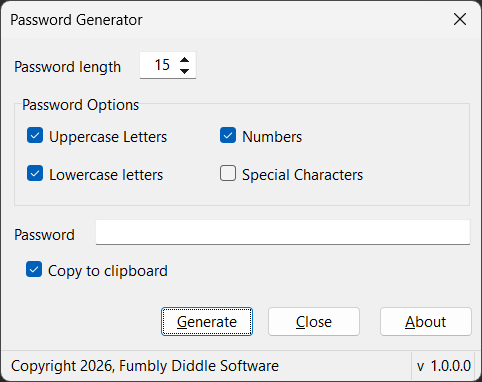
Select the number of characters of the generated password (the password length) then select other options for the generated password. Click the Generate button to generate a new password using the options selected in the form.
When you close the application, the application saves all the settings to the Windows Registry so they're available the next time you run the application.
Password Options
When generating passwords, the application selects from the following characters based on which options are selected:
- Uppercase Letters: A B C D E F G H I J K L M N O P Q R S T U V W X Y Z
- Lowercase Letters: a b c d e f g h i j k l m n o p q r s t u v w x y z
- Numbers: 0 1 2 3 4 5 6 7 8 9
- Special Characters: ! @ # $ % ^ & * ( ) ? > < / ~ ` : ; + = - { } [ ] * . ,
Copy to Clipboard Option
When you enable the Copy to clipboard checkbox, the application automatically copies the generated password to the system's clipboard after it completes generating the password.